
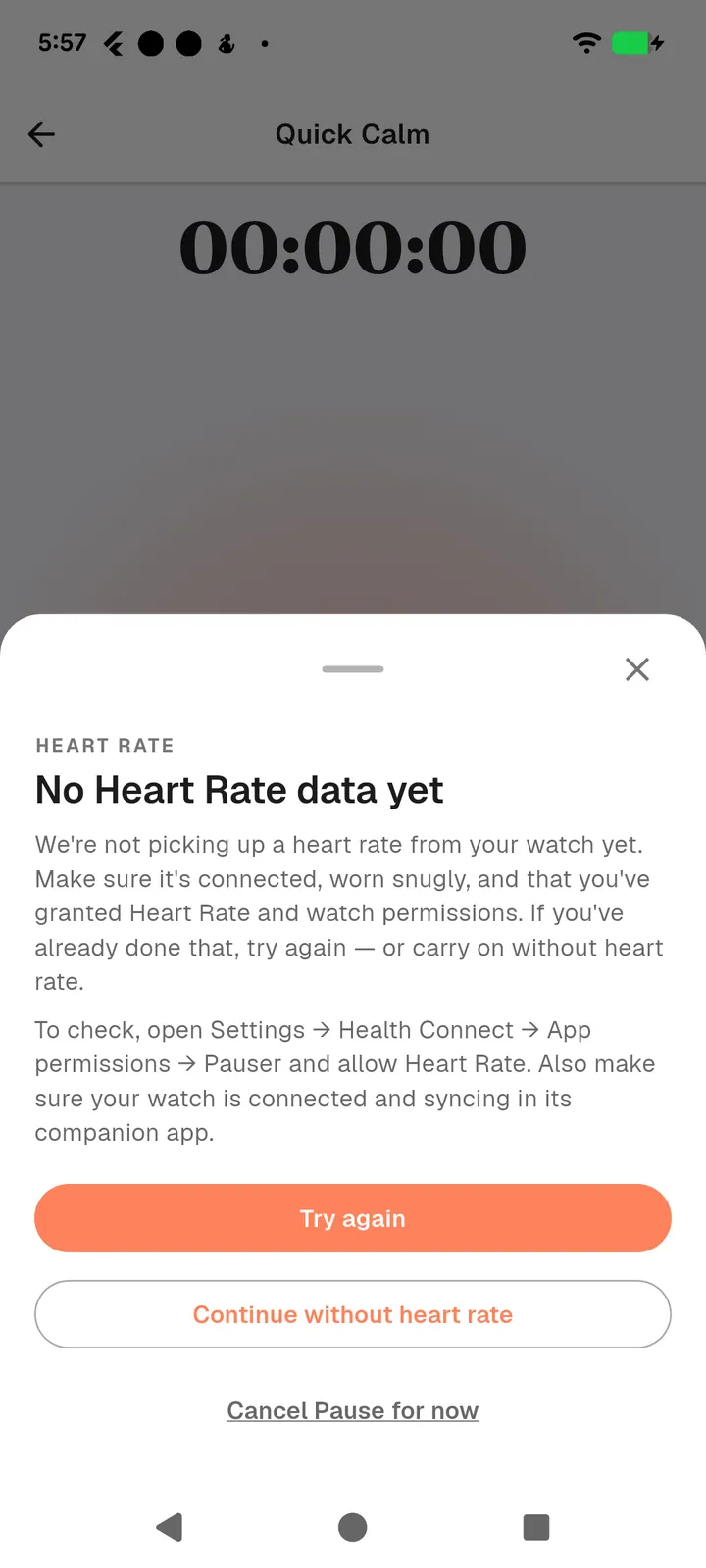
When Pauser is set up to use your watch, each Pause first spends up to about 25 seconds getting your heart rate (“Connecting your watch for Heart Rate data”). If no reading arrives in that time, you see No Heart Rate data yet.
You can choose:
- Try again: Pauser listens for your watch again.
- Continue without heart rate: the Pause goes ahead, just without heart rate.
- Cancel Pause for now: ends the Pause and takes you to Home.
- The X at the top right of the message: ends the Pause and returns you to where you were.
Before you tap Try again, check that:
- Your watch is on, connected to your phone, and worn snugly.
- On iPhone: Pauser can read Heart Rate and Workouts. Open the Settings app, then Health, then Data Access & Devices, then Pauser.
- On an Android phone: the Pauser app is installed on your Wear OS watch and the watch is connected. Heart rate during a Pause comes straight from that watch app. The message on your phone also suggests allowing Heart Rate in Health Connect, but Pause heart rate doesn’t come through Health Connect, so check the watch first.
On an Android phone, if Pauser on your watch isn’t allowed to read heart rate, you see Heart rate access is off on your watch instead. Tap Allow on watch and confirm on the watch. The Pause carries on by itself once access is given.
If Pauser isn’t set up with a watch, a Pause doesn’t wait for heart rate and you won’t see this message.
Still stuck? Tap Support at the top of Home, or open the menu and tap Message us. You can also email support@pauser.health.