
Open the Pause tab, pick a technique on Breathe, choose a duration and tap Start Breathing.
- Tap Pause at the bottom of the screen.
- On the Breathe tab, tap a technique card, for example Calm After Work. To go straight to one of its patterns, tap the pattern name on the card instead.
- Under Select Technique, check the pattern you want.
- Under Select Duration, tap 3, 5, 7 or 10 Min, or tap the last circle to pick any length from 1 to 120 minutes. 5 minutes is selected when the screen opens.
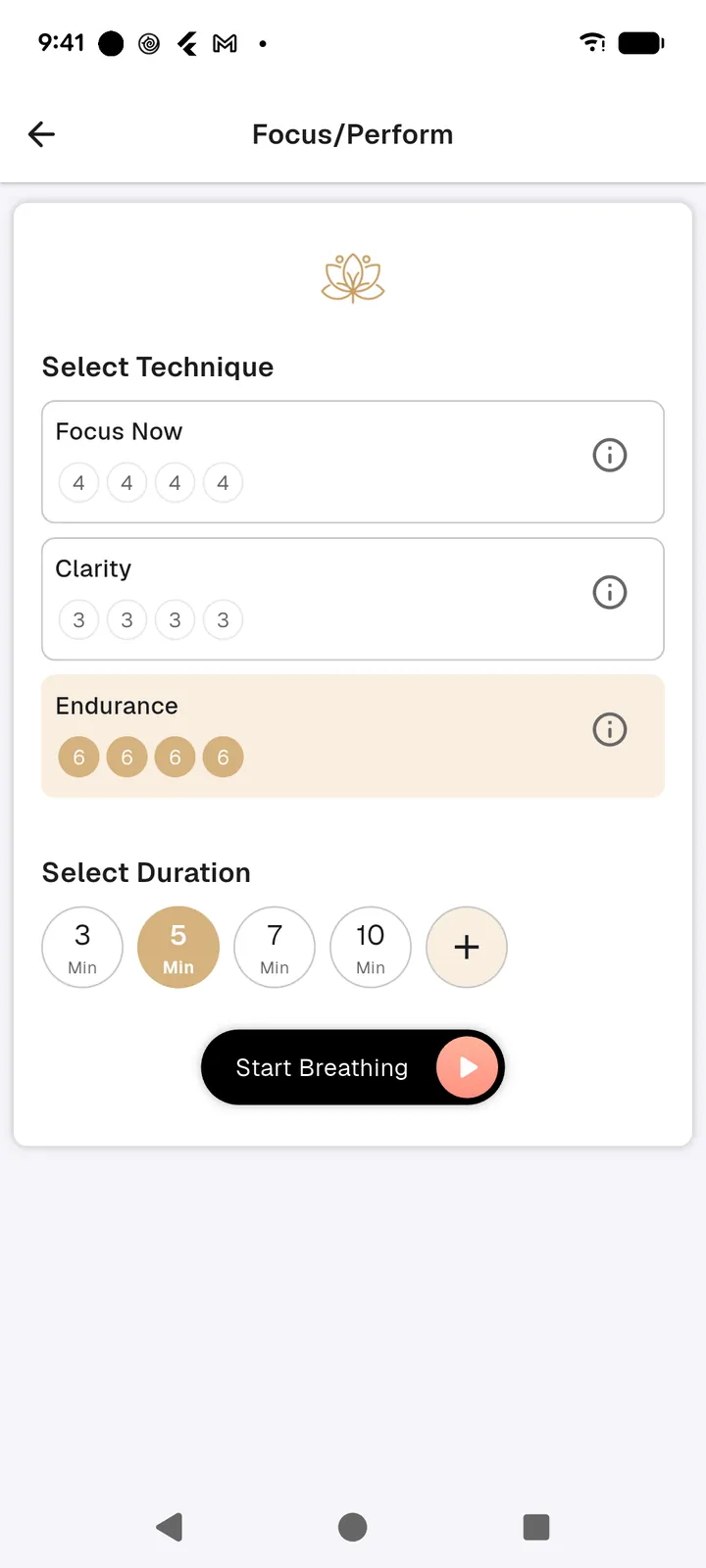
- Tap Start Breathing, then follow the circle and the Inhale, Hold and Exhale prompts.

The numbers under each pattern, such as 4-4-4-4, are seconds: breathe in, hold, breathe out, hold.
Good to know:
- Quick Calm (30 Seconds) skips these steps and starts right away.
- If Pauser is set up to use your watch, the session first shows “Connecting your watch for Heart Rate data” for up to about 25 seconds. Without a watch, you see a short “Your session will start in” countdown.
- A session runs to the end of the last full breath, so it can last a few seconds longer than you picked.
- To end early, tap the round stop button with a square in it, at the bottom of the screen. The session is saved and its details open. Going back or leaving the app also ends and saves it.
- Some features depend on your plan. To see what yours includes, open the menu and tap the plan badge under your name.
Still stuck? Tap Support at the top of Home, or open the menu and tap Message us. You can also email support@pauser.health.