
Use the five tabs along the bottom for the main areas, and the menu (top left) for everything else.
Bottom tabs:
- Home: your cards for the day.
- Pause: guided breathing and meditation.
- Monitor: your Activity Monitor sessions.
- Alerts: your Heart Rate Alerts by day, week or month.
- Insights: trends and patterns over time.
On Home:
- Support at the top opens a chat with our team.
- More (the three dots) has Notifications, Customize dashboard and Settings.
- The + button opens Quick Add, for logging something in a tap.

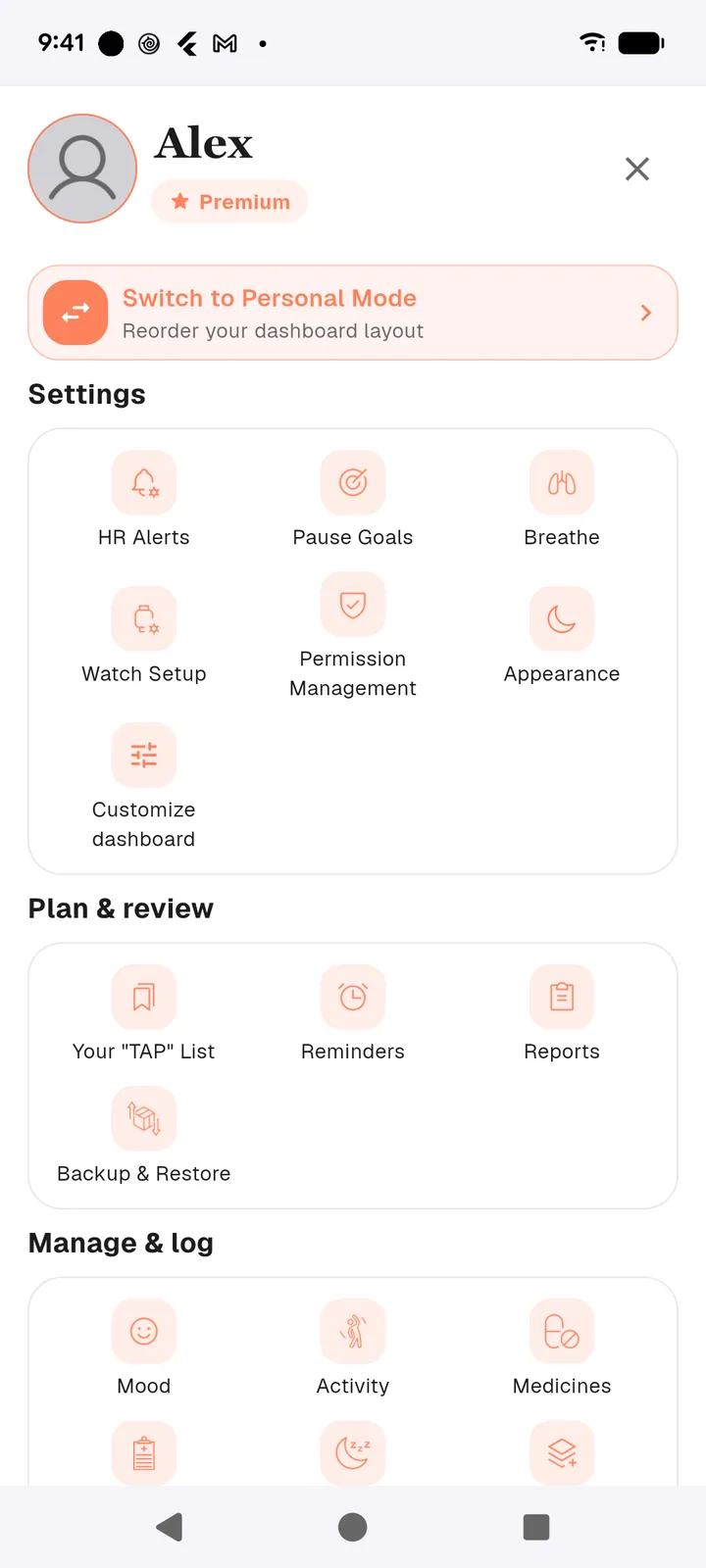
The menu opens from the icon at the top left. Tap your name for your Profile. Below that:
- A switch between the POTS and Personal layouts.
- Settings: alerts, goals, breathing, watch, permissions, appearance and Home cards.
- Plan & review: your “TAP” List, reminders, reports, and backup and restore.
- Manage & log: mood, activity, medicines, Bio Vitals, sleep and custom causes.
- Learn & support: Quick Read, Message us, the introduction, FAQ, feedback, contact and About Pauser.
- Logout at the bottom.
Still stuck? Tap Support at the top of Home, or open the menu and tap Message us. You can also email support@pauser.health.