
Open Standing check history. It lists your most recent checks, newest first, including ones you ran on your watch.
To open it:
- POTS layout: on the Standing test card on Home, tap the history (clock) icon, or History.
- Personal layout: open the menu and tap Sit-Stand history under Manage & log.
What you see:
- A summary at the top with your Avg rise, Max rise and the number of checks.
- A Create Sit-Standing Test Report button (see How do I share my Standing Check results with my clinician?).
- One row per check, with its date and numbers. Rows that didn’t finish normally show Ended early or Incomplete (see Why does my result say “Ended early” or “Incomplete”?).
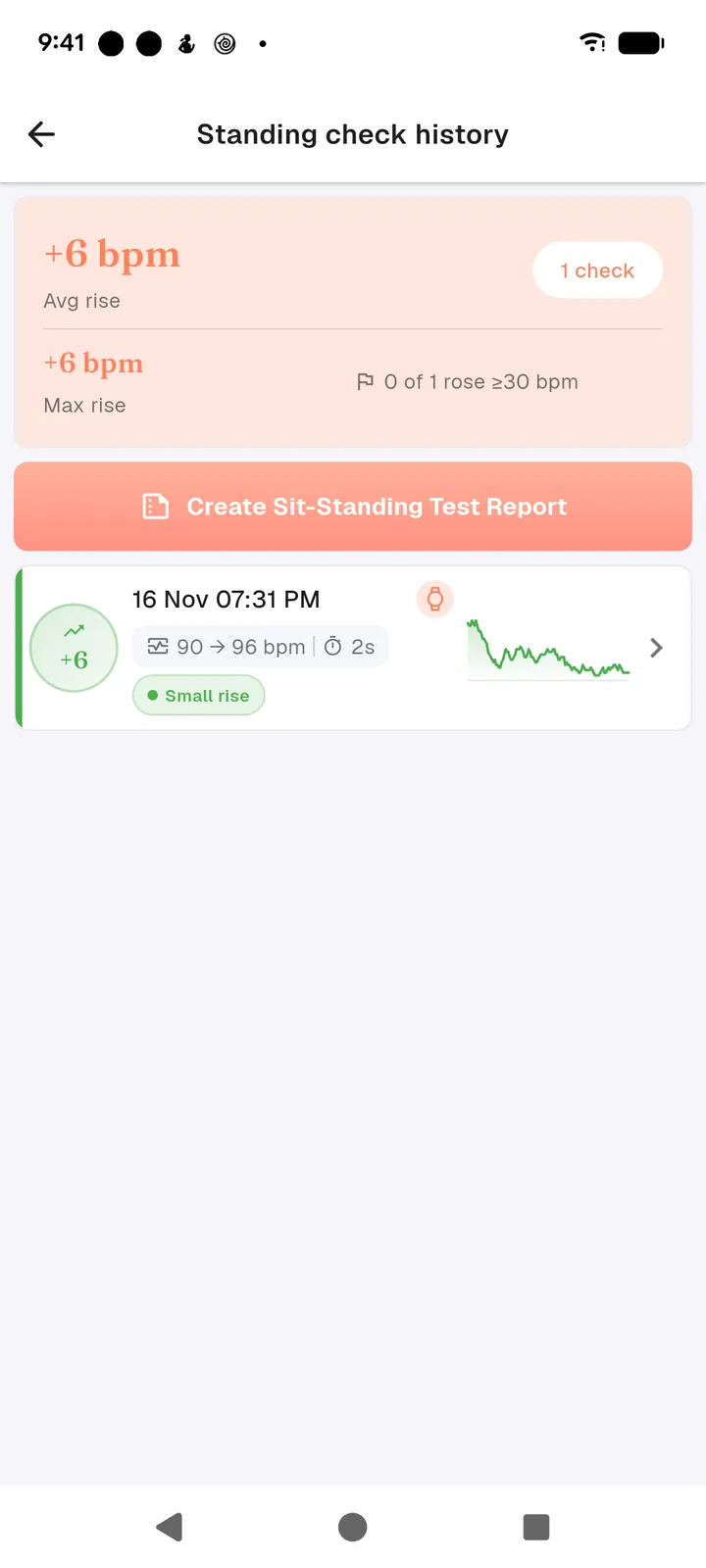
Tap a check to see its details, including a graph of your heart rate during the check. Checks from your watch are marked Recorded from watch. On the details screen you can also turn Add to report on or off.
Good to know:
- The list shows up to your 50 most recent checks.
- If you have none yet, it says No standing checks yet.
Some features depend on your plan. To see what yours includes, open the menu and tap the plan badge under your name.
Pauser shares wellness insights, not medical advice. If you have questions about your readings or how you feel, talk to your clinician.
Still stuck? Tap Support at the top of Home, or open the menu and tap Message us. You can also email support@pauser.health.